

2026 Buick Envision Hidden Features
2026 Buick Envision Hidden Features
Posted on August 18, 2026
Hidden Features of the 2026 Buick Envision You’ll Actually Use
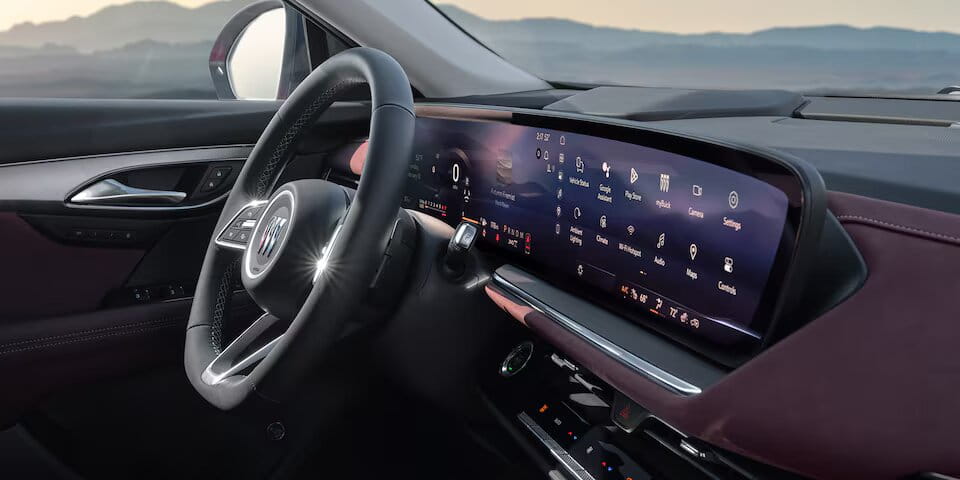
The 2026 Buick Envision is easy to appreciate for its refined interior, all-wheel-drive capability, and modern design. Some of its most useful technology, however, may not become obvious during a short test drive.
From directional safety alerts to customizable display information, these overlooked Envision features can make commuting, parking, and family travel around Richmond Hill more convenient.
Equipment can vary by trim, package, and connected-service status. Confirm the features included on the specific Envision you are considering.
1. The 30-Inch Display Can Reduce Screen Clutter
The Envision’s ultrawide 30-inch diagonal display combines vehicle information and infotainment functions in one continuous layout. Its value goes beyond its size: drivers can organize commonly used information so they spend less time moving between menus.
Before driving, take a few minutes to:
- Select the information shown in the driver display
- Arrange frequently used apps and shortcuts
- Pair a compatible phone
- Set preferred audio and navigation sources
- Remove unnecessary information from the main view
Complete the setup while parked so the display supports the drive rather than becoming a distraction.
2. Google Built-In Works Without Phone Mirroring
Where equipped and activated, Google built-in compatibility can provide access to Google Maps, Google Assistant, and compatible apps through the vehicle’s infotainment system.
Drivers can use supported voice commands to find a destination, adjust certain vehicle functions, or locate nearby businesses. This can be more convenient than handling a phone, but available services, subscriptions, and data requirements should be confirmed before relying on them.
3. The Head-Up Display Can Show More Than Speed
The available head-up display projects selected information onto the windshield within the driver’s field of view. Depending on settings and equipment, this may include speed, navigation guidance, and certain driver-assistance alerts.
Owners may overlook the ability to adjust the display’s height, brightness, and content. Set it from your normal driving position so the information is visible without blocking your view of the road.
4. The Safety Alert Seat Shows Where a Warning Is Coming From
Instead of relying only on audible chimes, the Safety Alert Seat can provide vibration pulses on the left, right, or both sides of the driver’s seat. The location of the vibration helps indicate the direction of a detected concern.
| Seat Alert | What It May Indicate | Driver Response |
|---|---|---|
| Left-side vibration | A detected concern toward the left | Check the display, mirrors, and surrounding area |
| Right-side vibration | A detected concern toward the right | Assess the relevant side before continuing |
| Both sides vibrate | A warning that requires immediate attention | Look ahead and respond as conditions require |
Drivers who prefer audible warnings may be able to change the alert type in the vehicle settings. The seat does not identify every possible hazard, so direct observation remains essential.
5. HD Surround Vision Offers Selectable Camera Views
Available HD Surround Vision can display multiple digital perspectives around the Envision. Drivers can select a view that helps with positioning near parking lines, curbs, garage walls, or other vehicles.
The displayed guidelines can show where the vehicle is heading as the steering wheel turns. Camera views should always be combined with mirror checks and direct observation because low or moving objects may not appear clearly.
6. The Following Distance Indicator Uses Time, Not Car Lengths
The Following Distance Indicator can display the estimated gap, measured in seconds, between the Envision and a detected vehicle ahead. This provides a more useful reference than trying to count vehicle lengths, which become less meaningful as speed changes.
The indicator does not automatically establish a safe following distance. Weather, visibility, traffic, and road conditions may require the driver to leave substantially more space.
7. Teen Driver Can Encourage Better Habits
Teen Driver can associate selected settings with a key fob and provide an in-vehicle report card. Depending on configuration, it can help encourage seat-belt use, limit certain available functions, and prevent some safety systems from being disabled.
Families should configure the system together and explain what is being monitored. It works best as a coaching tool paired with clear expectations, supervised practice, and regular conversations about driving decisions.
8. Rear Seat Reminder Is a Routine Prompt
Rear Seat Reminder can provide a message and chime after the vehicle is turned off when a rear door was opened around the beginning of the trip.
The system does not detect people, pets, or objects. It simply reminds the driver to check the rear seats, making it useful for backpacks, groceries, equipment, and family travel.
9. OnStar Adds Support Beyond Navigation
Depending on the active plan and vehicle capability, OnStar services can support functions such as navigation, connected assistance, Automatic Crash Response, and remote commands.
Owners should review which services are included, when trials or plans renew, and how to contact an advisor. Our OnStar information page provides a useful starting point.
10. Driver-Assistance Sensors Need a Clear View
Several Envision features depend on exterior cameras, radar, or other sensors. Snow, dirt, road salt, heavy rain, glare, or damage near a sensor can cause a feature to become temporarily unavailable.
If a warning appears:
- Move to a safe location.
- Check the owner’s manual for the relevant sensor area.
- Clean the area using the recommended method.
- Restart the vehicle only when safe.
- Arrange an inspection if the warning remains.
Explore the 2026 Buick Envision in Richmond Hill
The best way to understand these features is to see them demonstrated on the exact Envision you are considering. Our team can identify its equipment, explain the display settings, and help you practise using the camera and alert systems.
Browse our new vehicle inventory or visit us in Richmond Hill to compare current Buick Envision configurations.